Open-source electronic lab notebook
A lab notebook that stays on your own machines.
Experiments, protocols, runs, workflows and analyses, kept as plain files your lab owns. Every save is kept, records can be signed and witnessed, and the whole lab can share one notebook from a server you run.
Free for macOS, Windows and Linux.
Your data stays with the lab
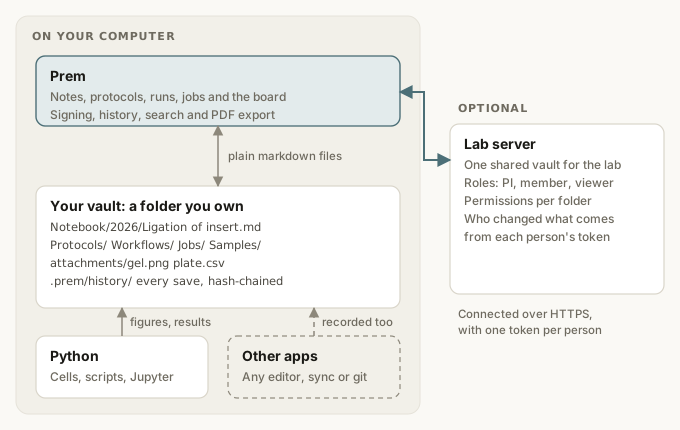
Notebooks are folders of markdown and attachments, on your computer or a server you run. No account with us, no cloud, and nothing locked into a format only Prem can read.
Built for the bench
Protocols with checkable steps, runs that record when each step was done, workflows that hand jobs from person to person, and samples with IDs.
Records you can stand behind
Every save is kept in a tamper-evident history. Sign an entry to lock it, have a colleague witness it, and change it later only through an amendment with a reason.
Analysis in the record
Run Python in an entry, or write to it from your scripts and Jupyter. Every result says which code, data and packages made it, and can be rerun to check.
How a record moves through Prem
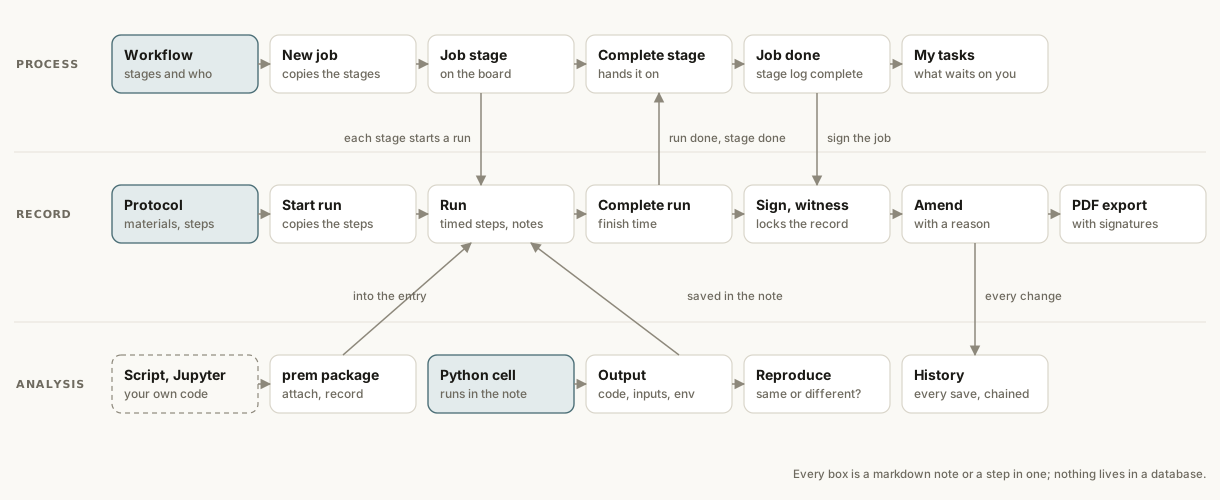
A workflow starts jobs, and each stage of a job starts a run of a protocol. Finishing the run finishes the stage and hands the job to the next person. Runs and jobs are signed, witnessed and exported to PDF. Analyses land in the same entries, and every change is kept.
Workflows, jobs and the board
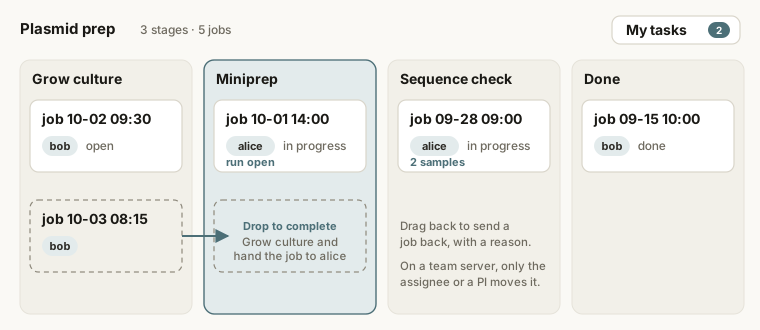
Write a lab process once as a workflow: its stages, the protocol for each, and who does it. Every job of it shows on the board. Drag a card to the next column to complete a stage and hand the job on, or back to redo a stage with a reason. My tasks shows what's waiting on you.
On a team server, only a job's assignee or the PI moves it on.
Sign, witness, amend
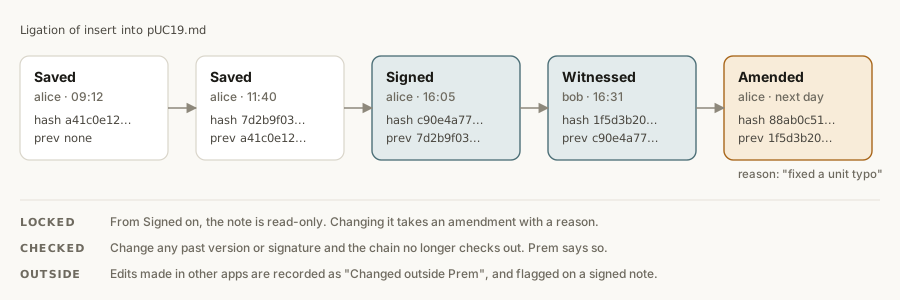
Every save of an entry is kept, and each one includes the hash of the one before. Sign an entry to lock it, have a colleague witness it, and change it later only through an amendment with a reason. Alter anything in the past and Prem shows that the history no longer checks out.
Signatures are recorded attestations, not cryptographic signatures yet. Prem is not certified for 21 CFR Part 11.
Analysis you can rerun
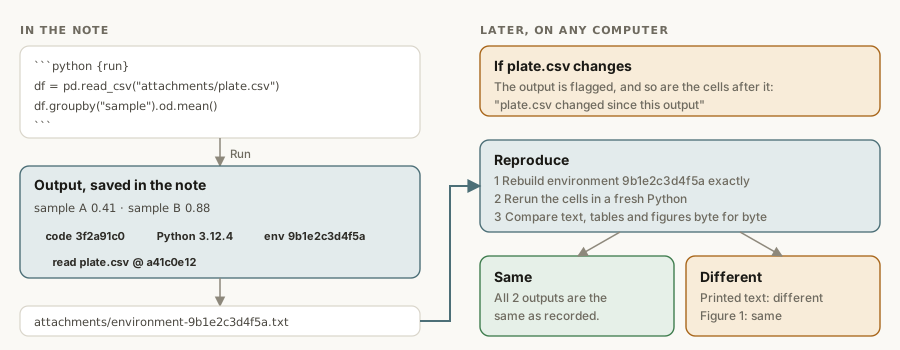
Put a python {run} cell in an entry. Its output is saved under it with the code version, the files
it read and the exact packages it ran with. If the data changes, the output is flagged.
Reproduce rebuilds the environment, reruns the cells and says what still matches.
From scripts and Jupyter, the prem Python package attaches figures
and records results into the same entries.
Where Prem is going
Now: pilot
Protocols and runs, workflows with a board, signing and history, Python cells you can reproduce, the
prem package, PDF export and a lab server you run.
Next: samples and instruments
A sample registry with freezer maps, plate layouts, reagent lots and equipment, Open in Jupyter, and instrument folders that file new data where it belongs.
Later: stronger records
Per-person signing keys, scheduled pipelines on the lab server, and signed installers with auto-update.
Follow along or help shape it on GitHub Discussions.